Backflow software for utility programs.
BackflowCore.ai gives water utilities one operating record for assemblies, tester readiness, submissions, notices, dashboards, map visibility, and hazard follow-up.
Registry and assembly history
Track assemblies, properties, serials, hazard class, due dates, and test history from one system.
Tester readiness controls
Verify tester status, credential documents, and calibration evidence before submissions move forward.
Review, notices, and dashboards
Keep submissions, notices, dashboards, and reporting connected instead of rebuilding the record from exports.
Designed for the way utility teams already run the program.
BackflowCore.ai is structured around the actual sequence utility teams manage: maintain the assembly record, verify tester readiness, collect the right submission, decide it, then move compliance and follow-up forward.
- Keep the assembly record stable even when a device is swapped, rebuilt, or retested.
- Search by serial number, address, tag, or property context before any test result is entered.
- Block submissions when tester approval, certification, or calibration evidence is no longer current.
- Keep notices, review decisions, and reporting trace tied to the same utility-controlled record.
Utilities do not need another disconnected form tool. They need cleaner control over registry accuracy, tester activity, review workload, and compliance visibility with a small team.
One authoritative record
Registry, submissions, notices, and reporting all point back to the same assembly and property record instead of separate spreadsheets or inboxes.
Scoped external workflows
Utilities stay in control while testers, service partners, and customer-facing workflows use the exact level of access they need.
Operational visibility
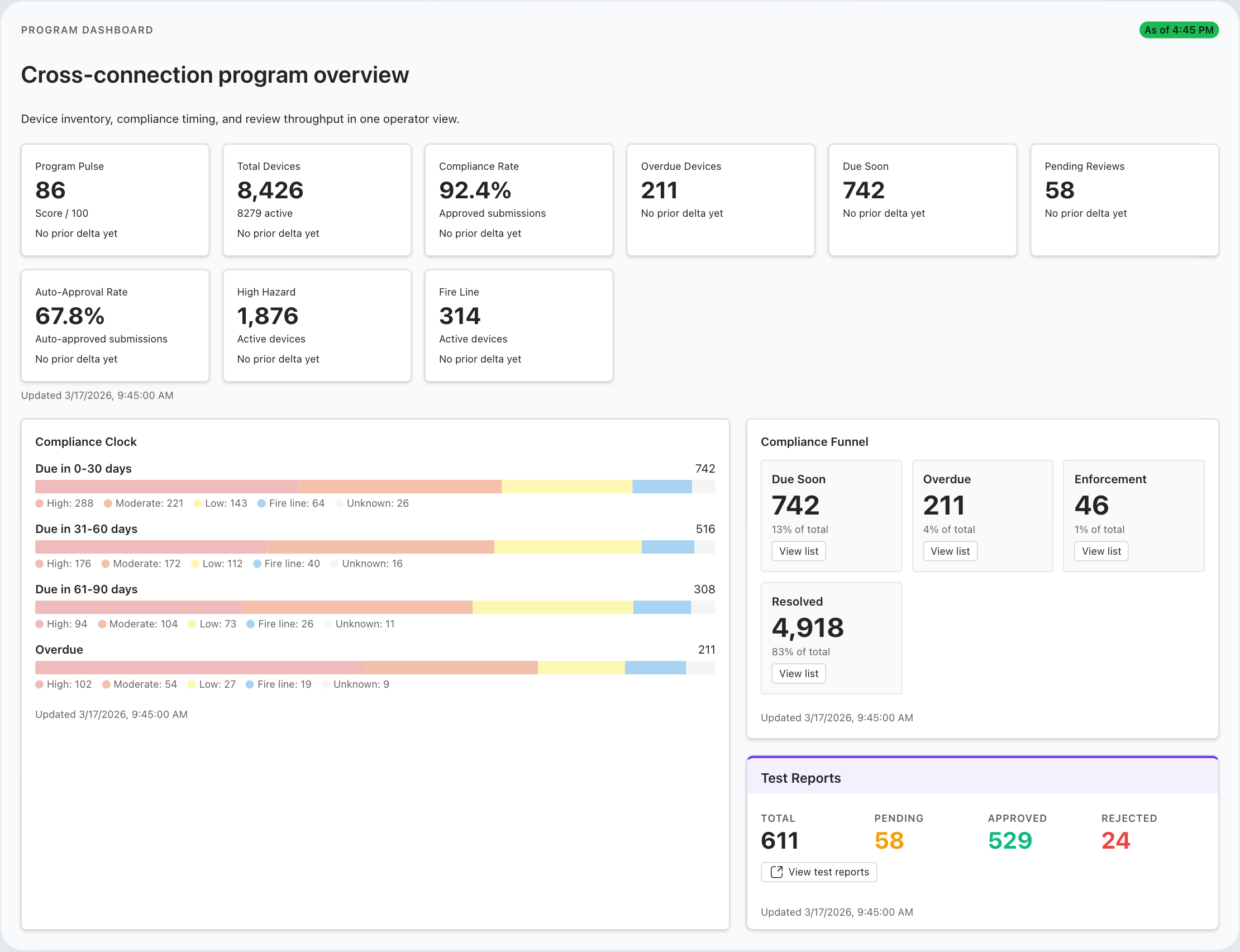
See queue pressure, overdue assemblies, notice history, and program risk without waiting for manual reconciliations.
Core workflows utilities can evaluate today.
BackflowCore.ai already covers the operating areas that matter most in evaluation: registry accuracy, tester verification, digital submissions, review and approval, compliance communications, and program visibility.
Assembly and property records
Maintain assembly type, serial, hazard class, service context, due cadence, location data, and test history from one record set.
Verification, credentials, and calibration
Support tester approval, document review, and calibration-aware controls before the utility accepts new work.
Dynamic forms, drafts, and attachments
Use device-specific forms, attachments, attestation, and draft support instead of email, PDFs, and manual re-entry.
Auto-approval and exception handling
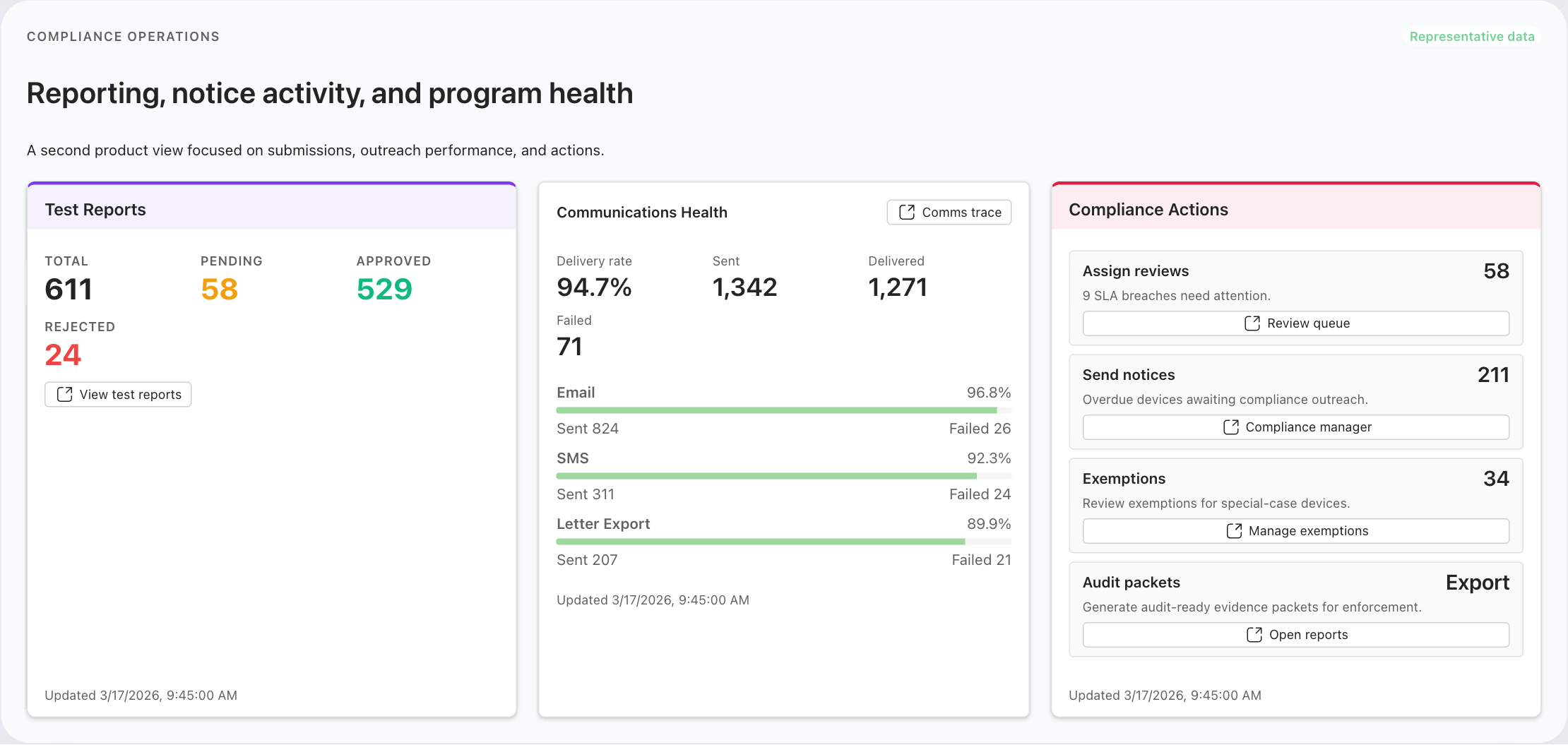
Let lower-risk submissions move quickly while failed, incomplete, or higher-risk records route into a utility review queue.
Notices, traceability, and reporting
Track due soon, in grace, overdue, and follow-up activity with notice history and reporting context tied to the same record.
Dashboards, maps, and hazard follow-up
Use dashboards, map-backed registry views, and hazard-related follow-up to see where program pressure is building.
From assembly lookup to compliance action.
The product becomes most useful when the full operating sequence stays connected from first lookup through approval, notices, and reporting.
Start from the assembly record
Work from the assembly, property, hazard, due-date, and location context already in the system.
Verify the tester and equipment
Confirm approval, credential validity, and calibration readiness before the utility accepts the submission.
Capture the right submission
Use device-specific forms, attachments, attestation, and draft support across authenticated and public submission paths.
Review, approve, or request correction
Apply policy-driven routing so routine work moves quickly and exceptions stay visible to staff.
Advance compliance and follow-up
Keep notice history, dashboards, maps, and reporting aligned to the same operating record without reconstructing it later.
Built for utility teams, testers, and partners.
BackflowCore.ai is utility-led software. The buyer is usually the utility or municipal program team, but the product also gets stronger when testers and service partners can participate through structured workflows.
Water utilities and municipalities
Best fit for teams managing recurring testing, notice stages, and reporting with limited staff and growing program pressure.
CCC managers and compliance staff
Built for the people keeping due dates, review queues, follow-up actions, and audit-ready records moving throughout the year.
Certified testers
Give testers a cleaner submission path with better device lookup, readiness checks, attachments, and status visibility.
Consultants and industry partners
Evaluate the product around workflow design, implementation planning, and the practical operating needs of the programs they support.
Trust starts with rollout clarity.
Because BackflowCore.ai is early, teams should be able to evaluate the product through the things that matter before go-live: structured rollout work, tenant-scoped access, auditable records, export-ready program data, and practical early operating support.
Implementation and rollout
Start from a defined implementation sequence covering tenant setup, imports, policy configuration, tester onboarding, and go-live validation.
Security and access controls
Use tenant-scoped records, permission-based access, audit trails, and segregated file access as part of the operating model.
Exportability and tenant data control
Keep program settings, records, reviews, notices, and attachments in a structure that supports audited export and tenant-level administration.
Hands-on early operating support
Work through registry cleanup, tester readiness, notice policy, and the first live cycles with practical workflow support.
Available now, expanding carefully.
BackflowCore.ai already covers the core workflows utilities evaluate first. Additional policy depth and more advanced enforcement automation are being expanded deliberately rather than oversold.
Deeper policy configuration
Jurisdiction-specific policy depth and tenant-level configuration continue to build beyond the core operating workflows already available.
Advanced enforcement automation
More automated escalation and enforcement steps are planned as next-stage depth, not as today’s headline promise.
Broader dashboard customization
Current dashboards and reporting are part of the product today, while deeper shared and customizable dashboard options continue to mature.
Scheduling, payments, and unrelated utility workflows
The product stays focused on backflow program operations rather than drifting into adjacent systems that dilute that focus.
Join the early cohort shaping the product.
We are working with a limited group of utilities, municipalities, consultants, and industry partners who want closer collaboration during rollout and a direct voice in how the product evolves.
- Closer product access Work directly with the team refining registry, tester, submission, and compliance workflows.
- Practical rollout input Shape how implementation should work for real utility constraints and operating pressure.
- Selective early cohort This is a focused collaboration group, not a broad beta list.